
What Chartnaut is
Chartnaut is a trading terminal you can build into whatever you need. It is made for the manual trader today, with automated traders next. On the charts and beyond them, if you can describe it, you can have it.
It is designed to run on the AI subscription you already pay for, so the agents build on your own plan:
Claude Code
Codex
Grok, coming soon
Kimi, coming soon
 Claude Code
 Codex
CodexThat runs in Chartnaut Desktop, the app Chartnaut recommends you install. Ways to use Chartnaut compares it with the browser and the CLI.
Serious market research has always belonged to funds with a quant desk. We are building the harness and the scripting language that let agents do that work properly, so a retail trader gets the same depth of analysis from a laptop. The goal is agents that work for you on their own, test your ideas while you sleep, and make you a better trader for it.
The two halves of trading
Trading comes down to two questions. Is your edge real? And are you actually trading it? Almost everything in Chartnaut exists to help with one or the other.
We understand manual traders, and they have been underserved for a long time. The serious research tools are built for people who automate everything, and the trader making the calls by hand gets a charting package and a spreadsheet. Whether you trade on discretion or mechanically from a set of rules, Chartnaut helps you pull together the data points that anchor you to your best opportunities.
It covers both sides of the equation.
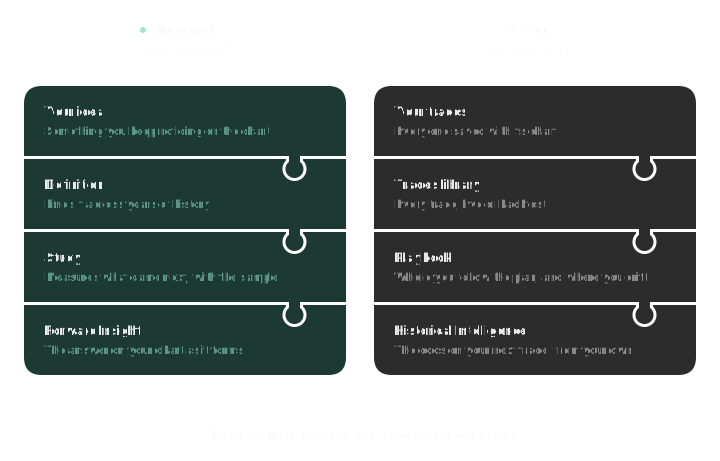
Confidence in your strategy. Before you trust a setup, test it against the market. A study measures what actually followed every time it happened across years of history, and a backtest lets you trade it yourself on past sessions, bar by bar. You go into the next trade knowing the numbers behind it.
Executing against it. Then Chartnaut helps you trade what you proved. A Forward Insight puts the evidence on the chart as the setup forms, every trade is saved with its chart, your playbook shows where you follow your plan and where you drift, and Historical Intelligence learns how you trade it.
Building blocks, not opinions
Most trading platforms decide how you should work: these charts, these panels, this way of journaling. Chartnaut takes the opposite approach. We build small, unopinionated pieces, and agents that know how to put them together for you.
Indicators, definitions, studies and apps are the pieces. Ask the agent for a session VWAP with two bands, a way to mark every failed breakout of the Asia session high, or a desk that shows BTC and ETH against VWAP with your open positions underneath. It builds it, checks it against real market data and hands it to you to approve. Over time the terminal becomes yours, shaped around how you actually trade.
In the charts
Charts is a full trading workspace: up to eight panels side by side, footprint, volume profile and TPO, your own indicators, and orders placed straight from the chart. A script can even be a whole new chart type.
Research lives here too. A Forward Insight puts a study's answer on the bar where your setup forms, so when the market does the thing you studied, you see what usually happened next before you decide.
Beyond the charts
Apps are panels the agent writes for you: a morning briefing, a scoreboard for your playbooks, a screener for your watchlist. Each opens as its own page, and can also appear as a tab on every trade, journal day and report.
You can work from outside the app as well. The Chartnaut CLI runs your indicators, definitions and studies from a terminal, Claude Code or Codex.
Find your way around
Area | What it is for | Where |
|---|---|---|
Chart, trade live and replay history | Trading → Charts | |
Connect Chartnaut Demo or a MetaTrader account | Trading → Accounts | |
A page for each trading day | Trading → Journal | |
Every trade, with its chart, notes and tags | Trading → Trades | |
One setup's rules, trades and reports | Trading → Playbooks | |
Trade past market days as if they were live | Tools → Backtest | |
Find a setup in history and study what followed | Tools → Definitions | |
Build your own indicators | Tools → Indicators | |
Panels the agent writes for you | Tools → Apps | |
Ask for any of the above in plain words | Agent, top of the sidebar | |
Run your scripts from a terminal or coding agent | Menu under your name → Developers |
 Chartnaut Demo
 MetaTrader
You never have to write code. Every piece is a script the agent writes, and the code is there if you want it: Scripting documents all of it.