
How your trades are recorded
Chartnaut saves every trade you take, wherever you took it, with its fills, chart snapshots and the path its P&L took while it was open. You add the rest: notes, a playbook, tags and your own properties. This page covers where trades come from, what each one holds, and the three places you read them.
Where trades come from
Each trade carries an origin, which you can filter by in Trades.
Origin | Where it came from |
|---|---|
Live | Placed through a connected account: MetaTrader, cTrader or Chartnaut Demo |
Imported | Closed trade history brought in from a broker account. See History import |
Adopted | A position that was already open at your broker when you connected. Chartnaut tracks it until it closes |
Backtest | Traded in a backtest session on past market data |
Hindsight | Logged on the chart after the fact, with entry and exit marked on historical bars |
 MetaTrader
 cTrader
 Chartnaut Demo
What is saved with each trade
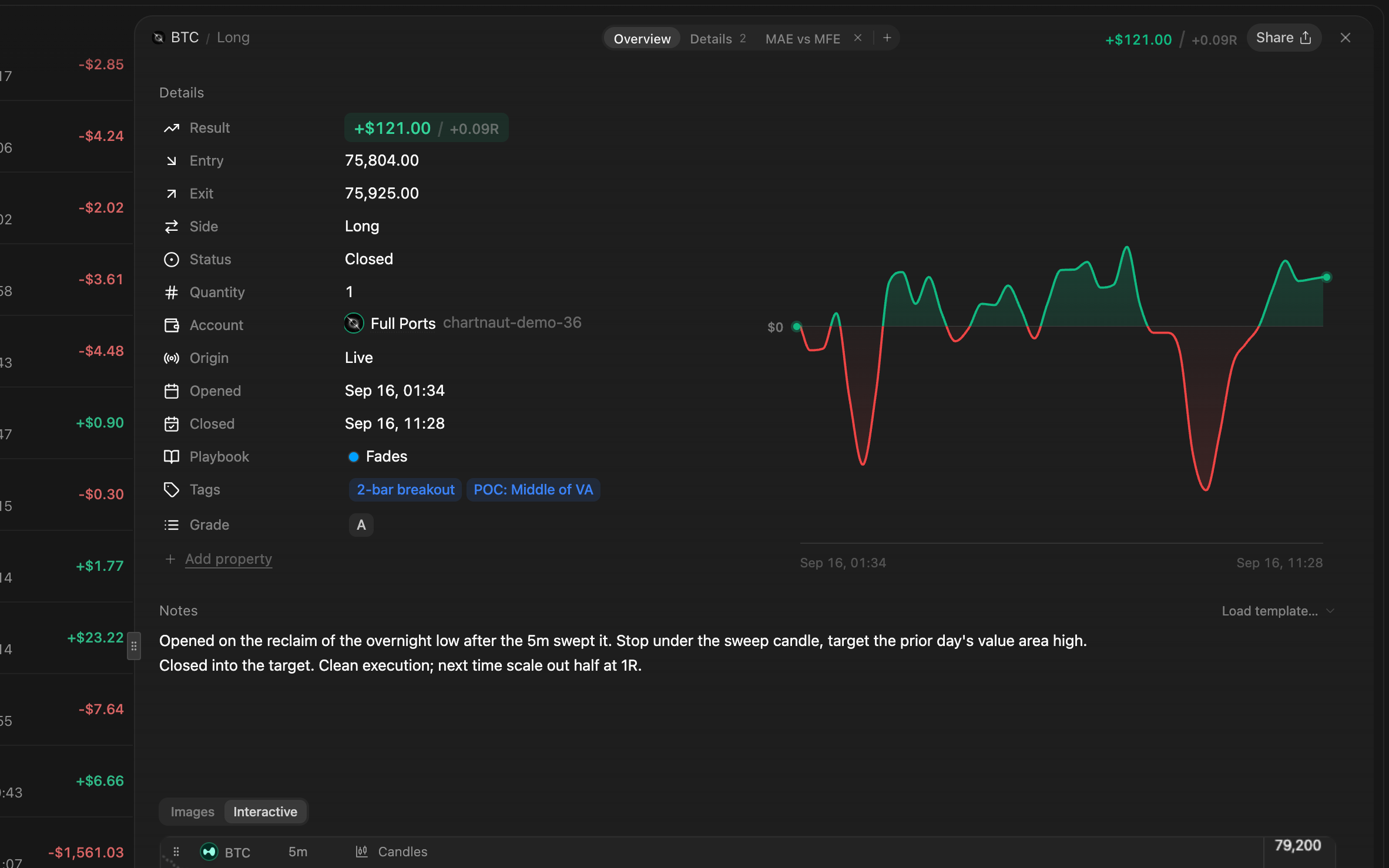
Open any trade and you see its detail:
Fills. Every execution, average fill price and commission, on the Details tab.
Snapshots. Images of your chart at open and at close, which you can also step through as an interactive replay. Chartnaut takes a snapshot only while it is open, so a trade that closes while Chartnaut is shut has no close snapshot. Imported trades have none. See Snapshots and replay.
P&L path. A chart of the trade's open profit and loss from entry to exit, beside its details.
MAE and MFE. How far the trade went against you and how far it went in your favour while it was open, in money and in R.
Notes. Free text, or a note template you load and fill in. See Notes, tags and templates.
Playbook and tags. Which playbook the trade belongs to, and which of its tags were true.
Properties. Fields you define yourself with Add property, such as a grade or a mistake.
Three places to read your trades
Place | Open it from | What it is for |
|---|---|---|
Trading → Dashboard | The headline numbers over 7 days to all time: trades logged, win rate, practice time, streak, and a calendar per account | |
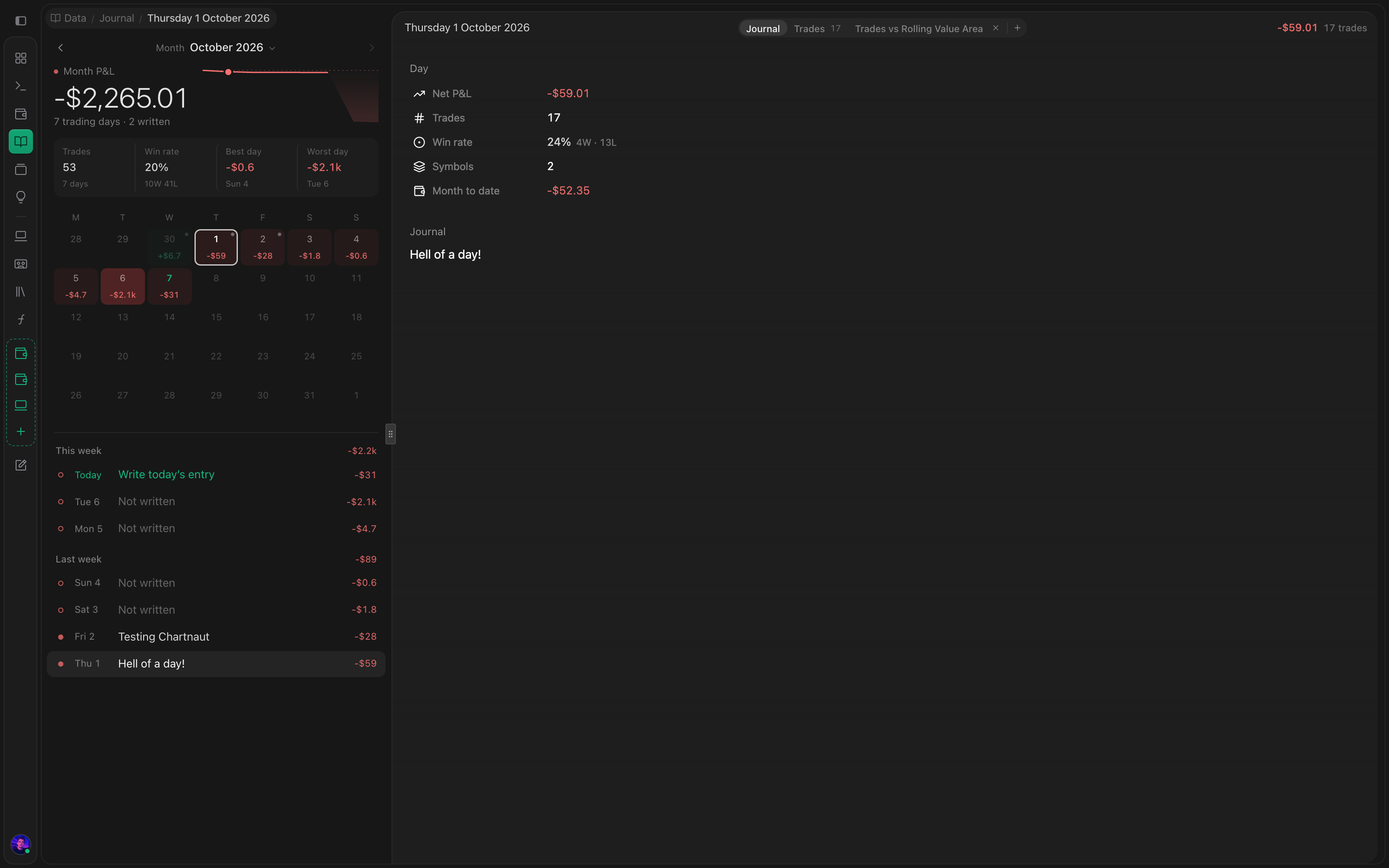
Trading → Journal | One page per trading day: the day's P&L, trades, win rate and symbols, beside your own notes | |
Trading → Trades | Every trade from every source, filtered by playbook, account, session, origin, outcome, properties or date |
The journal records the days you traded a live market, so it lists Live, Imported and Adopted trades. Backtest trades stay in Trades and in their session's reports. In a journal note, type @ to reference a trade, playbook or study.
Search, collections and sharing
The box in Trades takes a question in plain words, such as "my losing BTC trades that opened before 10:00", and finds the trades that match. See AI trade search. A set of results you want to keep can be pinned as a collection and opened again later. See Pinned collections.
Share on a trade saves it As image, as a styled card, or As video, which replays the trade on its chart. See Sharing a trade.
Your own views
You can add your own views to every trade, journal day, backtest session and playbook: a tab that shows exactly what you want to see about it. See Build your own pages, Views on trades and Views on journal days.